Guide · iPhone
How to bookmark a YouTube video at a specific time on iPhone
YouTube lets you save a video, but not the moment inside it. Here is a quick way to bookmark a YouTube video at a specific time without an app, and a way to keep many moments with notes.
Free for 10 videos with 3 markers each. No account.
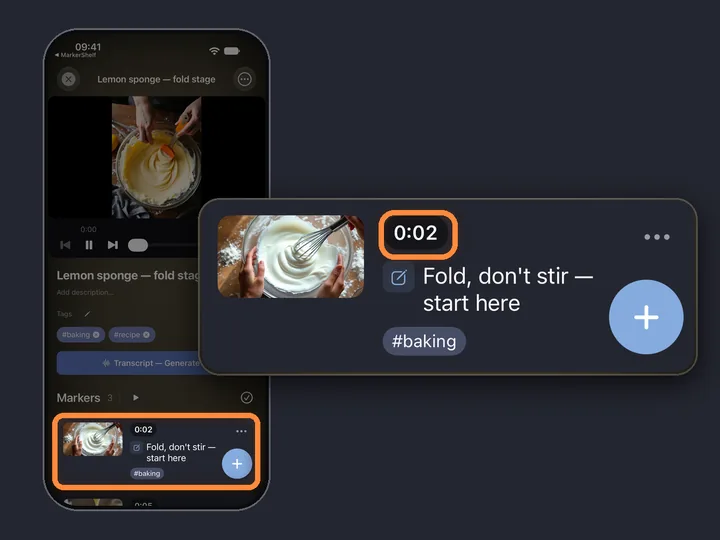
- 0:01Share the videoto MarkerShelf
- 0:02Tap +at the moment
- 0:03Add a noteand tags
- 0:04Jump backtap the marker
Short answer: YouTube's Save and Watch Later keep the whole video, not a second. Quick fix: copy the video link and add t= with the time in seconds, so it opens right there. To keep many moments with notes, share the video to MarkerShelf, play to the moment and tap +: the marker saves that second with a screenshot, you add a note, and one tap takes you back.
 By App Labs, the makers of MarkerShelfUpdated
With MarkerShelf: markers with a note and a screenshot
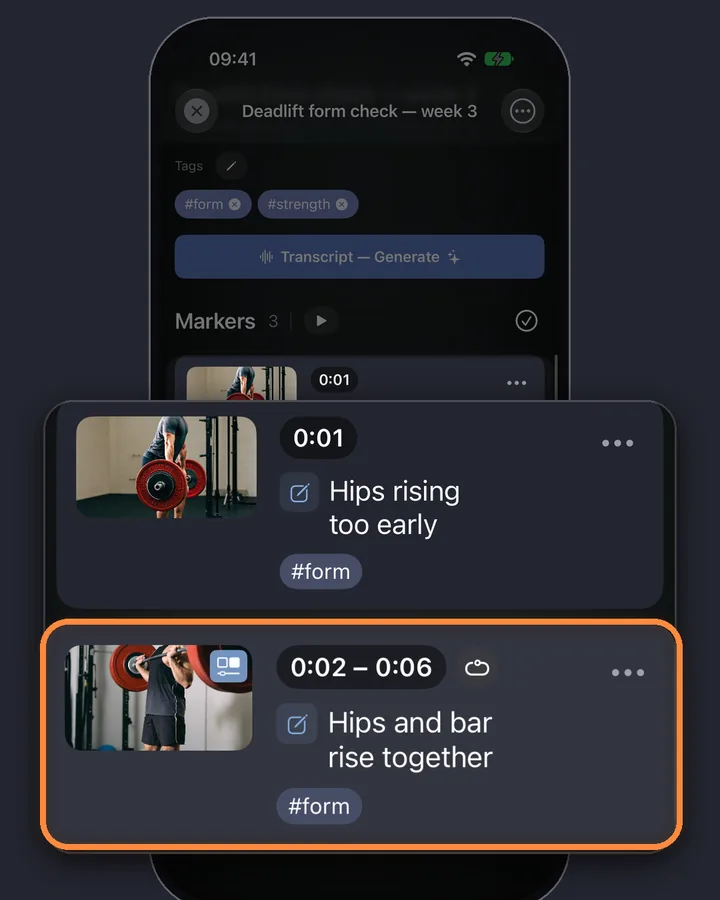
MarkerShelf is an iPhone and iPad app built for exactly this. Each bookmark is a marker: the exact second, a screenshot of the frame, your note and your tags, saved with the video in your library.
0:01Step 1 of 4
Send the video to MarkerShelf
In the YouTube app, tap Share and pick MarkerShelf (tap More if it isn't in the row yet). The video is added to your library and plays from YouTube inside the app.
Already have a timestamp link? Paste or share a YouTube link that already has a time in it (?t=95, t=1m35s or #t=). MarkerShelf opens the video at that second with the Add Marker sheet ready, so saving it takes one more tap.
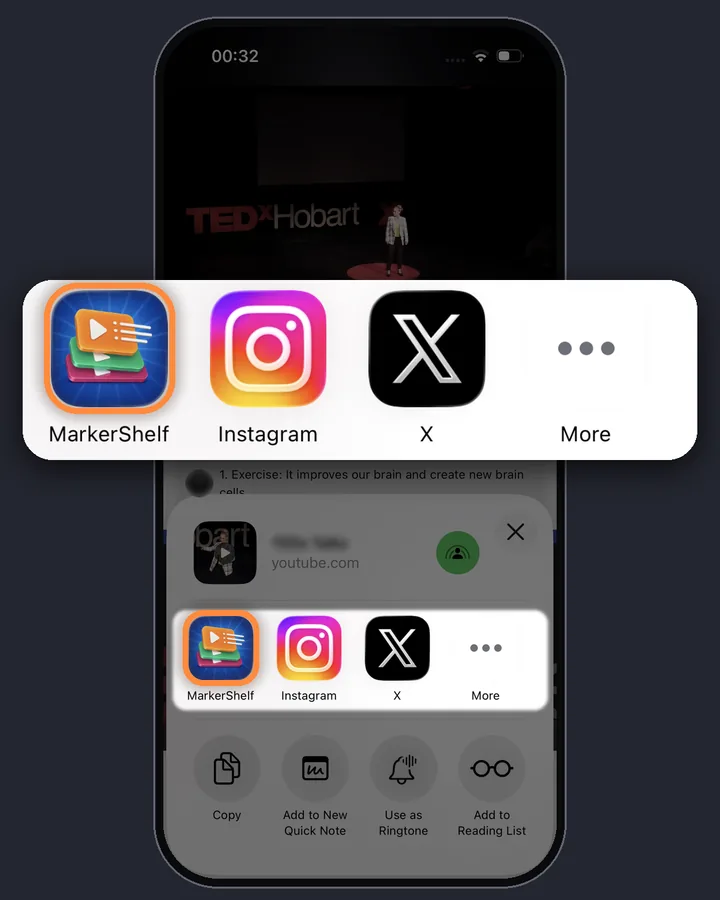
0:02Step 2 of 4
Play to the moment and tap +
When you reach the part you want to keep, tap the round + button. The marker is saved at that exact second right away, with a screenshot of the frame, so you don't lose the moment while you type.
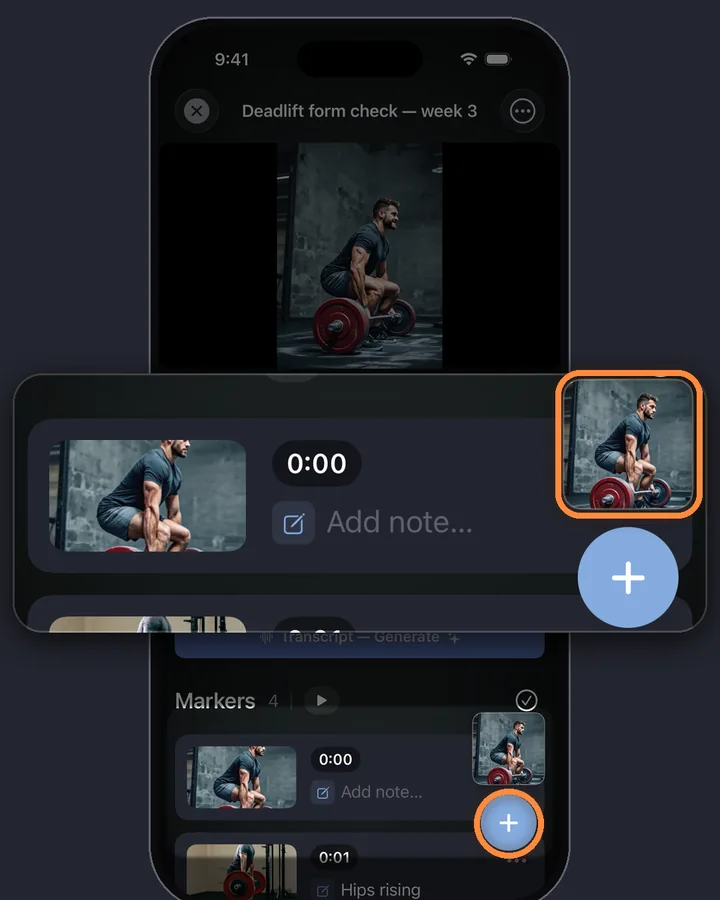
0:03Step 3 of 4
Add a note and tags
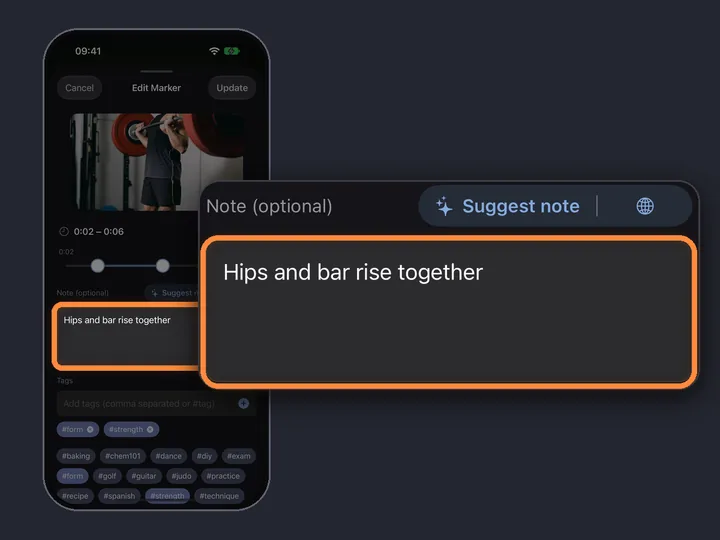
Right after you tap +, a small preview of the marker shows above the button for a few seconds. Tap it to open the marker editor, then write what this moment is about (“Fold, don't stir”, “Exam question”) and add tags like #recipe or #exam. Later, tap ⋯ on the marker, then Edit, to change it.
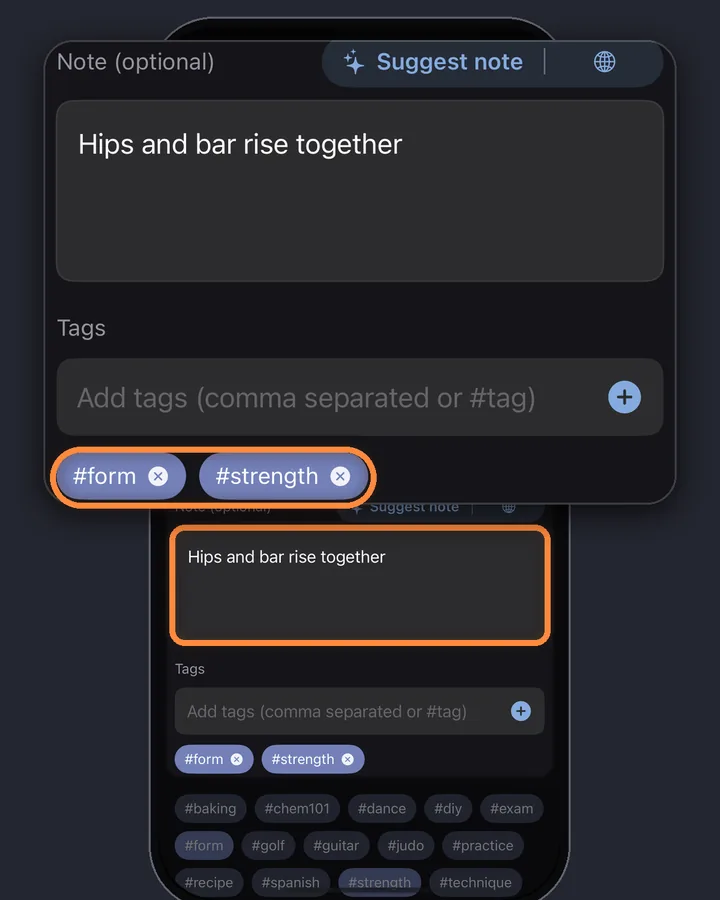
0:04Step 4 of 4
Tap the marker to jump back
Your markers sit under the video with their time, screenshot and note. Tap one and the video jumps to that exact second. Add as many as your plan allows: one for every step, riff or quote.
MarkerShelf for iPhone and iPad
Never lose a moment in a video again.
Save the exact second of a video with a note and a screenshot, and jump back to it in one tap.
Free to start. No account needed.

Why YouTube's own buttons can't do it
YouTube has three features that sound like bookmarks. None of them keeps a private moment with a note:
Save and Watch Later
They add the whole video to a playlist. When you open it again, you start from the beginning (or wherever you stopped last).
Clips
They cut a short public clip of up to a minute. They're made for sharing, not for private notes, and not every video offers them.
Comments with a time
A time like 4:12 in a comment becomes a tappable link, but comments are public and you'd have to find yours again.
Quick way without an app: a timestamp link
A YouTube link can carry a start time. Opened later, the video starts at that second. In the YouTube app, pause at the moment, tap Share and turn on the switch with the current time (for example 2:30) before you copy the link. If you don’t see it, or you want another second, add the time yourself:
Or let our free YouTube timestamp link generator build the link for you. This works for one or two moments, but a list of bare links doesn't tell you which one was the good part.
- In the YouTube app, tap Share, then Copy link.
- Paste the link into Notes or a message to yourself.
- Add the time at the end:
&t=95for 1:35 (use?t=95if the link has no?yet).
Ranges, search and export
Bookmark a part, not just a second
Sometimes the moment is a stretch: a 20-second drill, a chorus, a proof. A range marker saves a start and an end; turn on its loop button and the part plays again and again. Range markers come with the Marker plan (3 per video) and Pro (unlimited). For a quick loop in the browser, try the free YouTube looper.
Find the moment again later
Bookmarks only help if you can find them. In MarkerShelf you can:
- Search your notes and tags across every video, on every plan.
- Tap a tag like #exam to see only the markers with it.
Take your bookmarks with you
Export a video's markers with times and notes: plain text with the Marker plan, PDF or Markdown with Pro. YouTube links in the export open at the marker's second.
TikTok, Instagram and other platforms
Markers work the same way for TikTok, Instagram, Facebook, X and LinkedIn videos, and for your own videos from Photos or Files. In exports, links to those platforms show the marker's time next to the link.
- YouTube
- TikTok
- X
- Photos
- Files
Pricing
Start free. Upgrade when the free limits get in your way.
Free
$0
No account needed
- 10 videos
- 3 markers per video
- 5 tags
- 1 collection
- Search titles, notes & tags
- Transcript, summary & translation previews
Marker
$2.99/mo
Unlimited bookmarking
- Unlimited videos
- Unlimited point markers
- Unlimited tags
- 1 collection
- Text export
- 3 range markers per video
Pro
Annual
Save 40%$4.17/mo
$83.88 $49.99/yr billed annually
or $6.99/mo monthly (no trial)
- Everything in Marker
- Unlimited range markers, loops & collections
- Full transcripts, AI summary, word search & translation
- PDF, Markdown & text export
App Store prices for United States, checked Oct 20, 2026.
Questions
About saving video moments in MarkerShelf.
Can you bookmark a specific time in a YouTube video?
Not inside YouTube: Save and Watch Later keep the whole video. You can make a link that starts at a given second by adding t= and the time to the video link, or save the moment as a marker with a note in an app like MarkerShelf.
How do I save a YouTube link with a timestamp on iPhone?
Pause at the moment, tap Share and turn on the switch with the current time (for example 2:30) before you tap Copy link. If you don’t see it, copy the link and add &t=95 to the end for 1:35; if the link has no question mark yet, use ?t=95. The free timestamp link generator on this site does it for you. In MarkerShelf you don't edit links at all: the marker keeps the second, and exported YouTube links already open there.
Does it work for TikTok and Instagram videos?
Yes. MarkerShelf markers work for TikTok, Instagram, Facebook, X and LinkedIn as well as YouTube, and for videos in your Photos or Files. Timestamp links with t= are a YouTube feature.
Is it free to bookmark YouTube moments in MarkerShelf?
Yes, for up to 10 videos with 3 markers each. The Marker plan ($2.99 a month) removes those limits and adds range markers and plain-text export.
Do I need an account?
No. MarkerShelf works without signing up. If you use iCloud, your markers also show up on your iPad.
Save the moment, not just the video.
Save the exact second of YouTube, TikTok, Instagram, Facebook, X and LinkedIn videos with a note, and get back to it in one tap.