Comparison · October 2026
The best YouTube summarizer apps for iPhone in 2026
We checked eight ways to summarize YouTube videos on iPhone: what each does, which videos it handles, what it costs and where it runs.
Free to start. Full AI features with Pro.
 MarkerShelfYouTube, TikTok, Instagram, Facebook, X, LinkedIn and your own videos
Best free
MarkerShelfYouTube, TikTok, Instagram, Facebook, X, LinkedIn and your own videos
Best free YouTubeIts own transcript panel and chapters, free and already on your phone
Best for a knowledge base
YouTubeIts own transcript panel and chapters, free and already on your phone
Best for a knowledge base RecallArticles, PDFs, podcasts and videos in one searchable library
Short answer: MarkerShelf covers the most video sources on iPhone and keeps the moments that matter. Glasp and Readwise Reader are better if you read as much as you watch, mostly on a computer. Recall suits a knowledge base of everything you save, and NoteGPT and Eightify are strongest in a desktop browser.
We make MarkerShelf. We rank it first for the reasons below and name where others are stronger. Facts checked Oct 20, 2026 (App Store / vendor pages); App Store prices for United States, web prices in US dollars; prices change.
The ranking
Eight options, ranked on features rather than reviews. Every fact was checked on October 20, 2026.
-
#1 MarkerShelfour app
- Best for More than YouTube
- Free · Pro $6.99/mo
- iPhone
- iPad
People who save videos from more than YouTube and want the moments, not just a summary.
MarkerShelf is a video library for iPhone and iPad. Share a video from YouTube, TikTok, Instagram, Facebook, X or LinkedIn, or add your own from Photos or Files. It makes a transcript, shows captions over the video and writes a summary: a one-sentence TL;DR plus 3 to 6 key points, each with a timestamp you can tap to jump to that moment.
- Runs on
- iPhone and iPad (iOS 26), synced through iCloud, no account
- Video sources
- YouTube, TikTok, Instagram, Facebook, X, LinkedIn, plus your own videos
- Price (Oct 2026)
- Free with previews; Marker $2.99/mo; Pro $6.99/mo or $49.99/yr with a 7-day free trial on the yearly plan
- Last iOS update
- October 2026
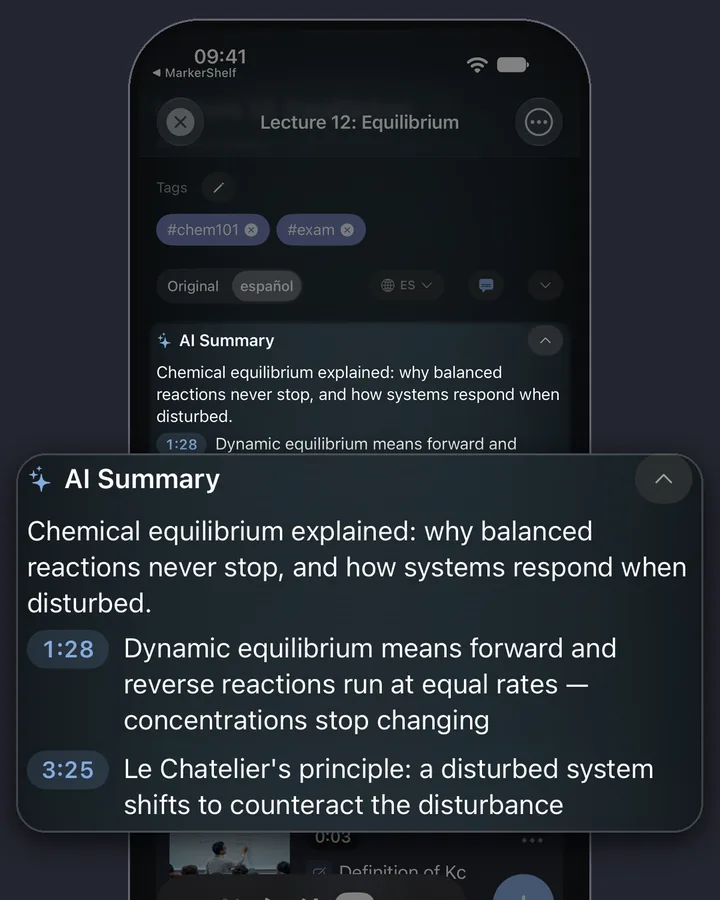
The AI summary in MarkerShelf: a one-line TL;DR and key points with timestamps you can tap. Strengths
- Six video platforms plus your own videos in one library.
- Transcripts for videos with no captions.
- Summary points with timestamps that jump to the moment.
- Markers: save a second with a note and tags. Range markers loop a section for practice (Marker plan: 3 per video, Pro: unlimited).
- Pro translates the transcript, captions and summary into your language and searches the spoken words of all your videos.
Limits
- iPhone and iPad today; an Android app is in development. No web app or browser extension.
- The full transcript and summary, translation and spoken-word search need Pro. Free shows the first 30 seconds of an online video's transcript and a one-sentence summary.
- One summary format, no length options. Exports hold your markers and notes, not the transcript or summary.
- A new app with no App Store ratings yet. Public posts only, up to 180 minutes, no live streams.
Download on the App StoreFree to start. Full AI features with Pro. -

#2 Glasp
- Best for Reading + watching
- Free tier · Pro from $12.50/mo
- iPhone
- iPad
- Android
- Web
- Extensions
People who read and watch on a computer and want highlights from articles and YouTube in one place.
Glasp began as a social web highlighter. It now writes AI summaries of YouTube videos and web pages with transcripts and timestamps, and tapping the timestamp of a YouTube highlight jumps to that moment. It syncs to Notion and has extensions for Chrome, Safari, Edge and Firefox.
- Runs on
- iPhone, iPad, Android, web, Chrome, Safari, Edge and Firefox
- Video sources
- YouTube (plus web pages and PDFs)
- Price (Oct 2026)
- Free: basic YouTube summaries 3 a day, advanced 3 per 7 days. Pro $12.50/mo billed yearly or $15/mo. Unlimited $30/mo. Students pay 40% less
- Last iOS update
- Oct 16, 2026
Strengths
- Runs in every major browser and on Android.
- Reading and video in one library, with social highlights.
- Notion auto-sync.
- A free tier with daily basic summaries.
Limits
- Its pages mention only YouTube for video.
- The listing does not mention loops or transcripts of your own videos.
- Free summaries are capped per day and per week.
-
#3 Eightify
- Best for Desktop Chrome
- Pro $9.99/mo
- Chrome
- iPhone
Summarizing YouTube in a desktop Chrome browser.
Eightify is a YouTube summarizer best known for its Chrome extension (200,000 users on the Chrome Web Store). It gives a TL;DR and key points with timestamps, plus an overview of the top comments. Its App Store text says it supports 40+ languages.
- Runs on
- Chrome extension and iPhone. An Android app was announced in 2024 (press release); we could not find its current Google Play listing
- Video sources
- YouTube
- Price (Oct 2026)
- Eightify Pro $9.99/mo or $59.99/yr (App Store in-app purchases)
- Last iOS update
- Apr 3, 2025
Strengths
- A strong, widely used Chrome extension.
- A summary of the comments, not just the video.
Limits
- As of Oct 20, 2026, the iPhone app's last update was April 3, 2025.
- Its listing mentions only YouTube.
- The listing does not mention personal notes, markers or a library.
-
#4 Recall
- Best for Knowledge base
- Free tier · Plus $10/mo
- iPhone
- iPad
- Android
- Web
- Extensions
Building a searchable knowledge base from articles, PDFs, podcasts and videos.
Recall (recall.it, formerly getrecall.ai) saves and summarizes what you read, watch and listen to. Its App Store text names YouTube videos, podcasts, articles, PDFs and TikToks. It adds AI chat across your library, a knowledge graph and quizzes with spaced repetition.
- Runs on
- iPhone, iPad, Android, web, extensions for Chrome, Firefox, Edge and Safari
- Video sources
- YouTube, TikTok (plus podcasts, articles, PDFs)
- Price (Oct 2026)
- Free: 10 AI summaries a month, unlimited saving and notes. Plus $10/mo billed yearly. Max $38/mo billed yearly
- Last iOS update
- Sep 26, 2026
Strengths
- A broad second brain, far beyond video.
- Knowledge graph, quizzes and chat with a choice of AI model.
Limits
- The listing does not describe timestamp markers, loops or captions over the video.
- Instagram, Facebook, X and LinkedIn are not mentioned, and neither are your own videos.
-

#5 Readwise Reader
- Best for Heavy readers
- $119.99/yr
- iPhone
- Android
- Web
- Mac
- Windows
Heavy readers who also watch YouTube.
Readwise Reader is a read-later app that also handles YouTube: a time-synced transcript next to the video, highlights and notes while it plays, and the Ghostreader AI for summaries and questions. It runs on the web, iOS, Android, Mac and Windows, with an e-ink mode.
- Runs on
- iPhone, Android, web, Mac, Windows, browser extensions
- Video sources
- YouTube (plus articles and podcast transcripts)
- Price (Oct 2026)
- Part of the full Readwise plan: $12.99/mo or $119.99/yr as App Store in-app purchases, 30-day trial
- Last iOS update
- Oct 8, 2026
Strengths
- The best reading and highlighting workflow here.
- Many integrations, and apps on every major platform, e-ink included.
- Transcript highlights next to the video.
Limits
- Its docs say transcripts come from the creator's captions or YouTube's automatic captions. They do not describe speech-to-text of their own.
- YouTube is the only video source in its docs.
-
#6 TubeOnAI
- Best for Listening
- Several in-app plans
- iPhone
- Android
- Web
Listening to summaries of YouTube videos and podcasts.
TubeOnAI summarizes YouTube videos, podcasts, articles and PDFs, can play summaries as audio, and lets you follow creators to get summaries of new uploads. Its listing says summaries come in your native language.
- Runs on
- iPhone, Android, web
- Video sources
- YouTube (plus podcasts, articles, PDFs)
- Price (Oct 2026)
- Several in-app plans; prices differ by plan and country
- Last iOS update
- Sep 24, 2026
Strengths
- Audio summaries for listening on the go.
- Follow creators and get their new videos summarized.
Limits
- The listing does not mention TikTok, Instagram, transcripts or your own videos.
- Many plan names on the App Store, which makes prices hard to compare.
-
#7 NoteGPT
- Best for Desktop study
- Pro $9.99/mo
- Web
- Chrome
- Edge
Desktop study sessions and batch work.
NoteGPT is a web and browser-extension AI workspace. It summarizes YouTube videos with custom length and prompts, makes transcripts, handles videos without subtitles, works on up to 20 videos at once including playlists, and adds mind maps and AI chat. Its FAQ also names Vimeo, Udemy and Coursera, and you can upload your own audio and video files.
- Runs on
- Web, Chrome and Edge extensions. notegpt.io links only browser extensions (Oct 20, 2026); App Store apps with that name are published by other developers
- Video sources
- YouTube, Vimeo, Udemy, Coursera, file uploads
- Price (Oct 2026)
- Pro $9.99/mo ($108/yr), Unlimited $29/mo, Max $99/mo
- Last iOS update
- Chrome extension: Aug 25, 2026
Strengths
- Batch summaries and whole playlists.
- Uploads of your own files, and more sources than YouTube.
- Custom summary length and prompts, mind maps.
Limits
- notegpt.io links only browser extensions, not an iPhone app (Oct 20, 2026).
- TikTok and Instagram are not mentioned.
- Its pages do not describe saved markers or loops.
-
#8 YouTube
- Best for A quick free look
- Free
- iPhone
- Android
- Web
- TV
A quick look, free, with nothing to install.
The YouTube app already does a lot: a transcript panel (Show transcript), auto-translated captions, chapters, Watch Later and playlists. Its AI feature, Ask, answers questions about the video you are watching, but YouTube Help says it appears only on select videos, for signed-in users aged 13+, in supported languages and countries. Clips (5 to 60 seconds) are public, not private notes.
- Runs on
- iPhone, Android, web, TV
- Video sources
- YouTube
- Price (Oct 2026)
- Free
- Last iOS update
- Not checked
Strengths
- Free and already on your phone.
- Official captions and auto-translate.
Limits
- YouTube Help describes no private timestamp notes.
- Ask shows up only on select videos and in some countries.
- YouTube videos only.
#1 on this list · MarkerShelf
Never lose a moment in a video again.
Transcripts, captions and AI summaries for YouTube, TikTok, Instagram, Facebook, X and LinkedIn videos, on iPhone and iPad.
Free to start. No account needed.

At a glance
All eight side by side, from the App Store, vendor pricing pages and docs. App Store prices for United States, web prices in US dollars. Checked Oct 20, 2026.
| App | Runs on | Video sources | Videos without captions | Saved moments and notes | Price (Oct 2026) |
|---|---|---|---|---|---|
#1 MarkerShelf | iPhone, iPad | YouTube, TikTok, Instagram, Facebook, X, LinkedIn, your own videos | Speech-to-text (full transcript with Pro) | Markers with notes and tags; A–B loops on paid plans | Free previews; Pro $6.99/mo or $49.99/yr |
#2 Glasp | iPhone, iPad, Android, web, browser extensions | YouTube (plus web pages, PDFs) | Not listed | Highlights that jump to the moment | Free (3 basic summaries a day); Pro from $12.50/mo billed yearly |
#3 Eightify | Chrome extension, iPhone (Android app announced in 2024) | YouTube | Not listed | Not listed | Pro $9.99/mo or $59.99/yr |
#4 Recall | iPhone, iPad, Android, web, browser extensions | YouTube, TikTok (plus podcasts, articles, PDFs) | Not listed | Notes; timestamp markers not described | Free (10 AI summaries a month); Plus $10/mo billed yearly |
#5 Readwise Reader | iPhone, Android, web, Mac, Windows, browser extensions | YouTube (plus articles, podcasts) | Uses the video's captions (per its docs) | Highlights and notes on the transcript | $12.99/mo or $119.99/yr in the app (full Readwise plan) |
#6 TubeOnAI | iPhone, Android, web | YouTube (plus podcasts, articles, PDFs) | Not listed | Not listed | Several in-app plans |
#7NoteGPT | Web, Chrome and Edge extensions | YouTube, Vimeo, Udemy, Coursera, file uploads | Yes, on the web | Not listed | Pro $9.99/mo; Unlimited $29/mo |
#8 YouTube | iPhone, Android, web, TV | YouTube | Its own transcript panel, where available | Watch Later and playlists; Clips are public | Free |
Listed by the vendorNot listed on the App Store page, pricing page or docsPrices change. Sources at the end.
Which one should you pick?
Start from how you watch.
- If you also watch TikTok, Instagram, Facebook, X or LinkedIn videos, or your own recordingsMarkerShelf
- If your videos often have no captionsMarkerShelfNNoteGPT
- If you practice music, dance, a sport or a languageMarkerShelf
- If you read as much as you watch, mostly on a computerGlaspReadwise Reader
- If you want a second brain with quizzes and chatRecall
- If you live in desktop ChromeEightifyNNoteGPT
- If you want to listen to summariesTubeOnAI
- If you need Android todayMarkerShelf's Android app is in development.GlaspRecallReadwise ReaderTubeOnAI
- If you only need a quick look, for freeYouTube
Comparing two apps in detail? See the comparisons below. How the summaries work in MarkerShelf: AI video summarizer.
How we compared
We did not run a lab test. We read each app's App Store listing, the vendor's pricing page and help docs, and the Chrome Web Store listing where there is one, all on October 20, 2026, in the US. When a listing says nothing about a feature, we mark it "not listed" instead of guessing.
- A native iPhone app. Many summarizers live in a desktop browser.
- Sources beyond YouTube. TikTok, Instagram, Facebook, X, LinkedIn and your own recordings.
- Videos without captions. Many tools read YouTube's captions, so no captions means no summary.
- Timestamps. Can you tap a point and land on that moment?
- A library. Does the app keep your videos, notes and saved moments, or is each summary a one-off?
- Price and what the free tier really includes.
- Last update of the iPhone app.
What about ChatGPT or Gemini?
ChatGPT and Gemini are general assistants, and many people paste a YouTube link into them first. We found no official documentation on how either one handles YouTube links, so we make no claims about it here. Try it with your own videos.
The difference is the job. A chat app gives you an answer in a conversation. A video app keeps the video, transcript, summary and your saved moments together, so you can come back to the exact second. Browser assistants such as Monica, Merlin and HARPA belong with the chat apps: video summaries are one of many things they do.
Pricing
Start free. Upgrade when the free limits get in your way.
Free
$0
No account needed
- 10 videos
- 3 markers per video
- 5 tags
- 1 collection
- Search titles, notes & tags
- Transcript, summary & translation previews
Marker
$2.99/mo
Unlimited bookmarking
- Unlimited videos
- Unlimited point markers
- Unlimited tags
- 1 collection
- Text export
- 3 range markers per video
Pro
Annual
Save 40%$4.17/mo
$83.88 $49.99/yr billed annually
or $6.99/mo monthly (no trial)
- Everything in Marker
- Unlimited range markers, loops & collections
- Full transcripts, AI summary, word search & translation
- PDF, Markdown & text export
App Store prices for United States, checked Oct 20, 2026.
Questions
About YouTube summarizers on iPhone.
Is there an app to summarize YouTube videos on iPhone?
Yes. MarkerShelf, Glasp, Eightify, Recall, Readwise Reader and TubeOnAI all have iPhone apps that summarize YouTube videos. They differ in what else they do: MarkerShelf also handles TikTok, Instagram, Facebook, X, LinkedIn and your own videos and keeps markers with notes, while Glasp, Readwise Reader and Recall mix videos with articles and other reading.
What is the best free YouTube summarizer?
Free tiers are previews or capped. Glasp gives 3 basic YouTube summaries a day, Recall gives 10 AI summaries a month, and MarkerShelf Free shows a transcript preview (the first 30 seconds of an online video) and a one-sentence summary on every video you save. YouTube's own transcript panel and chapters cost nothing. For regular use, every option here has a paid plan.
Can I summarize a YouTube video without captions on iPhone?
With MarkerShelf, yes. When a YouTube video has no captions, it makes the transcript with speech-to-text and summarizes that (the full transcript and summary need Pro). Readwise Reader's docs say it relies on the video's captions. NoteGPT handles videos without subtitles, but in a browser, not in an iPhone app.
Can ChatGPT summarize YouTube videos?
Many people try it. We found no official OpenAI documentation on how ChatGPT handles YouTube links, so we can't say how reliable it is. Either way, a chat answer is not saved next to the video: there is no library, no timestamps to tap and no markers.
Do these apps work for TikTok or Instagram videos?
MarkerShelf works with TikTok, Instagram, Facebook, X and LinkedIn as well as YouTube, and transcribes their audio even without captions. Recall's App Store text names TikTok. NoteGPT's pages name Vimeo, Udemy and Coursera, but not TikTok or Instagram. The other apps here mention only YouTube for video.
Why is MarkerShelf first when it has no ratings yet?
We make it, and we rank on features, not on reviews: it covers the most video sources, works without captions and keeps your moments with notes. It is new (released August 2026), so it has no App Store ratings yet. If you need Android today (ours is in development), a desktop browser or reading tools, another app on this list will suit you better.
Sources
All checked October 20, 2026 (US). Prices change.
- MarkerShelf on the App Store
- Glasp pricing
- Glasp on the App Store
- Glasp on the Chrome Web Store
- Eightify on the App Store
- Eightify on the Chrome Web Store
- Eightify Android launch (press release)
- Recall pricing
- Recall on the App Store
- Readwise Reader
- Readwise pricing
- Readwise Reader docs: videos
- Readwise Reader on the App Store
- TubeOnAI on the App Store
- NoteGPT pricing
- NoteGPT YouTube summarizer
- NoteGPT on the Chrome Web Store
- YouTube Help: Ask
- YouTube Help: Clips
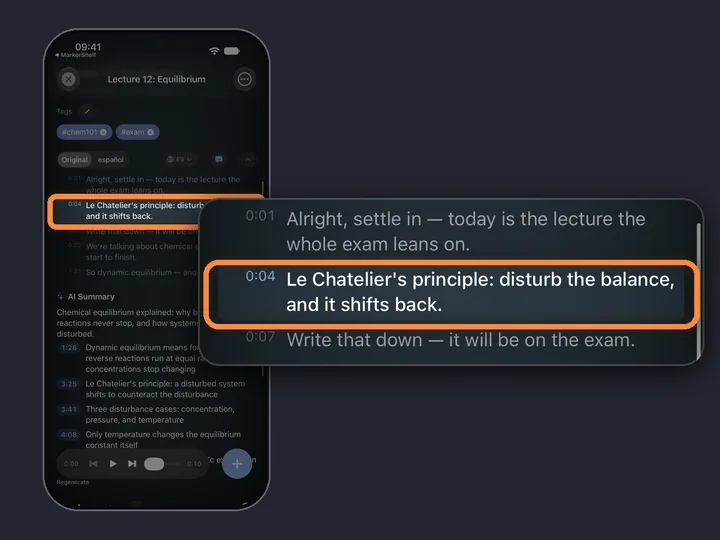
Try the #1 pick free on your iPhone.
Transcripts, captions and AI summaries for YouTube, TikTok, Instagram, Facebook, X and LinkedIn videos, on iPhone and iPad.