MarkerShelf Get the app

Comparison · October 2026

NoteGPT alternative for iPhone

NoteGPT is built for a desktop browser. MarkerShelf is an iPhone and iPad app for videos from six platforms.

Download on the App Store

Free to start. Full AI features with Pro.

Short answer

If you work on a computer, NoteGPT does more: batch summaries, playlists, file uploads and mind maps. If you watch on your iPhone, MarkerShelf is built for it: share a video from YouTube, TikTok, Instagram, Facebook, X or LinkedIn, get the transcript and a summary with timestamps, and save the moments you want to keep.

We make MarkerShelf, and we name where NoteGPT is stronger. Facts from notegpt.io, its FAQ and the Chrome Web Store; prices change.

MarkerShelfiPhone and iPad app
NoteGPTWeb and browser extensions

Pick MarkerShelf if…

  • You watch on iPhone or iPad
  • Your videos also come from TikTok, Instagram, Facebook, X or LinkedIn
  • You want to save moments with a note, or loop a section

Pick NoteGPT if…

  • You work mostly in a desktop browser
  • You summarize up to 20 videos or a playlist at once
  • You upload your own audio and video files on the web

NoteGPT vs MarkerShelf at a glance

Ten things people compare, side by side.

Feature
MarkerShelfiPhone and iPad
NoteGPTWeb and extensions
Where it runsiPhone and iPad app (iOS 26), iCloud syncWeb, Chrome and Edge extensions
iPhone appYes, nativenotegpt.io links only browser extensions
Video sourcesYouTube, TikTok, Instagram, Facebook, X, LinkedInYouTube; its FAQ also names Vimeo, Udemy and Coursera
Your own filesVideos from Photos or Files, transcribed on the deviceAudio and video uploads (up to 1 GB on Pro, 5 GB on higher plans)
Videos without captionsYes, speech-to-text (videos up to 180 min)Yes (its summarizer page says up to 150 min)
SummaryOne-sentence TL;DR plus 3 to 6 key points with timestamps; no length optionsCustom length and prompts
TranslationTranscript, captions and summary in your language (Pro)Subtitle translation (its pages say 40+ or 60+ languages)
Saved momentsMarkers with notes and tags; A–B loops (Marker and Pro plans)Not listed
Captions over the videoYes, per video, movable; the whole video with ProNot listed
Price (Oct 2026)Free with previews. Pro $6.99/mo or $49.99/yr, 7-day free trial on the yearly planPro $9.99/mo ($108/yr), Unlimited $29/mo ($239/yr), Max $99/mo ($829/yr). Free plan limits not published
Has itNot listed on its pagesFact Sources: notegpt.io, its pricing page (US dollars), its FAQ and the Chrome Web Store. MarkerShelf: App Store prices for United States. Checked Oct 20, 2026. Prices change.

Where each one is stronger

One is a study workspace for the desk, the other a video library for your phone.

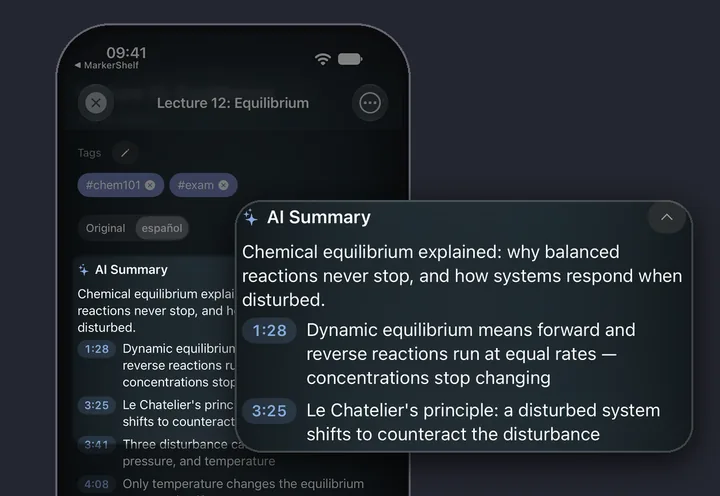
MarkerShelf AI summary: a one-line TL;DR and key points, each with a timestamp

MarkerShelf

A video library for your phone

You save videos from the apps you already watch in, and everything stays with the video.

  • The summary is a TL;DR plus 3 to 6 key points, and each timestamp jumps to that moment.
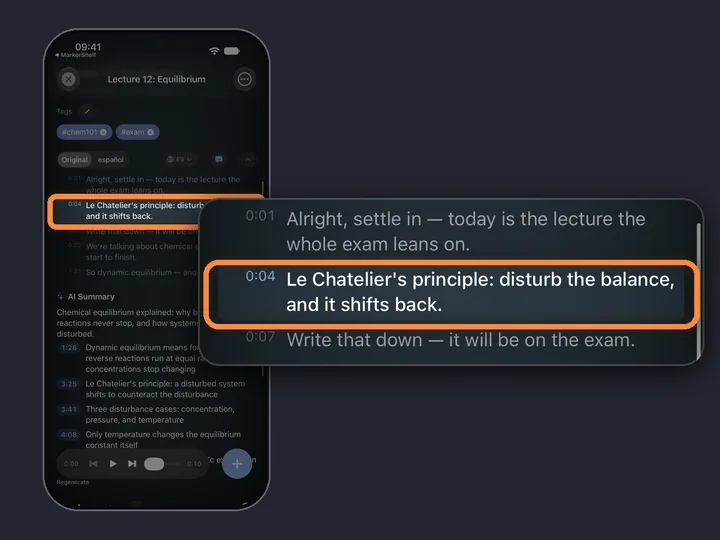
  • Markers save a second with a note and tags. Range markers loop a section (Marker plan: 3 per video, Pro: unlimited).
  • No account: your library syncs between iPhone and iPad with iCloud. MarkerShelf does not download videos; online videos play from the platform.


NoteGPT

A study workspace for the desk

On a computer, NoteGPT does things MarkerShelf doesn't try to do.

  • Batch work: up to 20 videos at once, including playlists.
  • Your own files: upload audio and video on the web.
  • More learning sources: its FAQ names Vimeo, Udemy and Coursera next to YouTube.
  • More study tools: mind maps, AI chat, custom summary length and prompts.
  • A large user base: 400,000 users of its Chrome extension (Chrome Web Store, Oct 20, 2026).

Or use both

They don't exclude each other. A common split: NoteGPT on the laptop for long YouTube lectures and playlists, MarkerShelf on the phone for the videos you find while scrolling and the moments you want to come back to.

For more options, see the best YouTube summarizer apps for iPhone, or read how MarkerShelf's AI video summarizer works.

On the laptop
NoteGPT

Long YouTube lectures and whole playlists.

On the phone
MarkerShelf

Videos you find while scrolling, and the moments to keep.

MarkerShelf exports your markers with timestamps and notes: Text on Marker, PDF Markdown on Pro.

Pricing

Start free. Upgrade when the free limits get in your way.

App Store prices for United States, checked Oct 20, 2026.

Questions

About NoteGPT and MarkerShelf.

Does NoteGPT have an iPhone app?

notegpt.io links only browser extensions for Chrome and Edge, plus its website (checked Oct 20, 2026). The App Store apps with that name are from other developers. Check the developer name before you pay.

Is there a free NoteGPT alternative?

MarkerShelf has a Free plan: up to 10 videos, 3 markers per video, and on every video a transcript preview and a one-sentence summary. The full transcript and summary, translation and search come with Pro ($6.99/mo, or $49.99/yr with a 7-day free trial). NoteGPT also has a free plan, but its pricing page does not list the limits.

Can MarkerShelf summarize videos without subtitles?

Yes. When a YouTube, X or LinkedIn video has no captions, MarkerShelf makes the transcript with speech-to-text. TikTok, Instagram and Facebook videos always go through speech-to-text, and your own videos are transcribed on the device. The summary is written from that transcript.

Does MarkerShelf work on desktop?

No. MarkerShelf runs on iPhone and iPad (iOS 26), with iCloud sync between them. There is no web app, Mac app or browser extension. If you work mostly at a computer, NoteGPT fits that better.

Can MarkerShelf transcribe TikTok and Instagram videos?

Yes, public TikTok, Instagram and Facebook videos up to 180 minutes, even without captions. The full transcript needs Pro.

Never lose a moment in a video again.

Transcripts, captions and AI summaries for YouTube, TikTok, Instagram, Facebook, X and LinkedIn videos, on iPhone and iPad.