MarkerShelf Get the app

Comparison · October 2026

Glasp alternative for video

Glasp is a highlighter for what you read, with AI summaries of YouTube videos on top. MarkerShelf is built only for video: six platforms plus your own recordings.

Download on the App Store

Free to start. Full AI features with Pro.

Short answer

Pick Glasp if you read and watch in a browser and want one library of highlights across articles, PDFs and YouTube, on every platform including Android. Pick MarkerShelf if your videos come from TikTok, Instagram, Facebook, X and LinkedIn as well as YouTube, if many of them have no captions, or if you want to mark and loop moments on your iPhone.

We make MarkerShelf, and we name where Glasp is stronger. Facts from glasp.co, the App Store and the Chrome Web Store; prices change.

MarkerShelfiPhone and iPad app
GlaspWeb, extensions and apps

Pick MarkerShelf if…

  • Your videos also come from TikTok, Instagram, Facebook, X or LinkedIn
  • Your videos often have no captions, or they are your own recordings
  • You want to save the exact second with a note, or loop a section

Pick Glasp if…

  • You highlight articles and PDFs as much as you watch videos
  • You need it in every browser and on Android
  • You like social highlights and Notion auto-sync

Glasp vs MarkerShelf at a glance

Ten things people compare, side by side.

Feature
MarkerShelfiPhone and iPad
GlaspWeb, extensions and apps
Where it runsiPhone and iPad (iOS 26), iCloud synciPhone, iPad, Vision Pro, Android, web, Chrome, Safari, Edge and Firefox
Video sourcesYouTube, TikTok, Instagram, Facebook, X, LinkedIn, plus your own videosYouTube
Other contentNone: video onlyWeb pages, PDFs, audio transcription (30 min a month free)
Videos without captionsSpeech-to-text (full transcript with Pro)Not listed
AI summaryOne-sentence TL;DR plus 3 to 6 key points with timestamps (Pro)Summaries with transcripts and timestamps
Saved momentsMarkers with the frame, a note, tags and the timeYouTube highlights; tapping a timestamp jumps to the moment
LoopsRange markers loop A–B (Marker plan: 3 per video, Pro: unlimited)Not listed
Sync and exportiCloud sync; markers export as text (Marker) or PDF and Markdown (Pro)Notion auto-sync
Free plan10 videos, 3 markers per video, transcript and summary previewsBasic YouTube summaries 3 a day, advanced 3 per 7 days
Paid plans (Oct 2026)Pro $6.99/mo or $49.99/yr (7-day free trial on yearly); Marker $2.99/moPro $12.50/mo billed yearly ($150/yr) or $15/mo; Unlimited $30/mo ($360/yr); students pay 40% less
Has itNot listed on its pagesFact Sources: glasp.co/pricing (US dollars), the App Store, Google Play and the Chrome Web Store. MarkerShelf: App Store prices for United States. Checked Oct 20, 2026. Prices change.

Where each one is stronger

One is a highlighter for everything you read, the other a library for the moments in your videos.

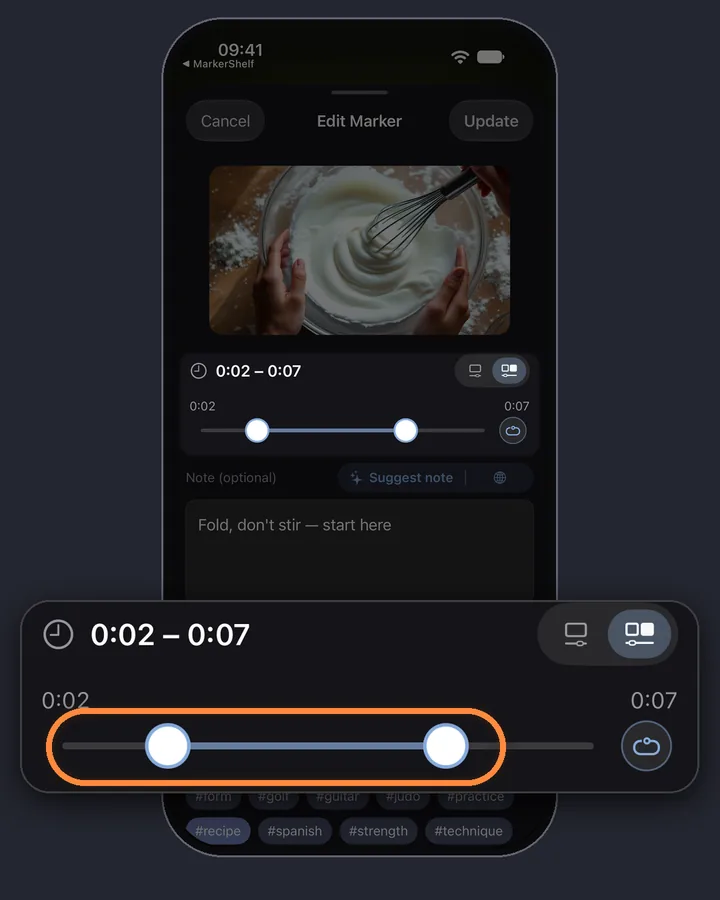
A range marker in MarkerShelf on a baking video: the frame, the part from 0:02 to 0:07 and a note

MarkerShelf

Built only for video

MarkerShelf does one thing: it keeps the videos you save from six platforms, and the moments inside them.

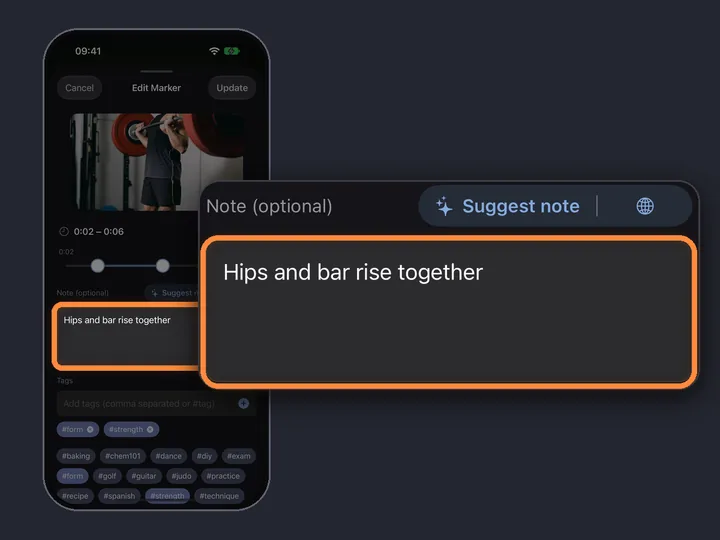
  • Every marker keeps the frame, a note and the time. Tap it and the video jumps to that second.
  • Range markers loop a section for practice: a guitar riff, a dance count, a phrase in another language (Marker plan: 3 per video, Pro: unlimited).
  • No account needed; iCloud keeps iPhone and iPad in sync.
Glasp

More than video, on more devices

Glasp covers far more than video, on far more devices. If those matter to you, it is the better pick.

  • Reading and watching in one library: articles, PDFs and YouTube highlights side by side.
  • Everywhere: iPhone, iPad, Android, the web and extensions for Chrome, Safari, Edge and Firefox.
  • Social highlights: follow other readers and share what you highlight.
  • Notion auto-sync for people who keep their notes there.
  • A free tier with basic YouTube summaries every day, and students pay 40% less.
  • A large user base: 500,000 users of the Chrome extension.

Or use both

Glasp and MarkerShelf overlap only on YouTube summaries. Many people would use Glasp for reading on the computer and MarkerShelf for the videos they save on the phone, including TikTok and Instagram, where Glasp's pages mention only YouTube for video.

Comparing more apps? See the best YouTube summarizer apps for iPhone, or read how MarkerShelf's AI video summarizer works.

On the computer
Glasp

Reading, with highlights from articles, PDFs and YouTube.

On the phone
MarkerShelf

The videos you save, including TikTok and Instagram.

MarkerShelf exports your markers with timestamps and notes: Text on Marker, PDF Markdown on Pro.

Pricing

Start free. Upgrade when the free limits get in your way.

App Store prices for United States, checked Oct 20, 2026.

Questions

About Glasp and MarkerShelf.

Is Glasp free?

Glasp has a free plan with basic YouTube summaries 3 times a day, advanced summaries 3 times per 7 days and 30 minutes of audio transcription a month. Pro is $12.50/mo billed yearly or $15/mo, and Unlimited is $30/mo (glasp.co/pricing, Oct 20, 2026, US).

Does Glasp work with TikTok?

Glasp's pages mention only YouTube for video (checked Oct 20, 2026). MarkerShelf works with TikTok, Instagram, Facebook, X and LinkedIn videos as well as YouTube, and transcribes their speech even when there are no captions.

Can I use Glasp and MarkerShelf together?

Yes, they do different jobs. Glasp keeps highlights from what you read and watch in a browser; MarkerShelf keeps videos and the moments in them on iPhone and iPad. MarkerShelf exports markers as Markdown with Pro, so your video notes can sit next to your Glasp highlights in the same notes app.

Does MarkerShelf highlight articles?

No. MarkerShelf is for videos only: YouTube, TikTok, Instagram, Facebook, X, LinkedIn and your own. For articles and PDFs, Glasp or a read-later app is the better tool.

Is MarkerShelf available on Android?

Not yet. MarkerShelf is on iPhone and iPad today, and an Android app is in development. Glasp has an Android app (50K+ downloads on Google Play), so for now it is the better choice if you switch between Android and iPhone.

Never lose a moment in a video again.

Save videos from six platforms, keep the moments that matter, and get transcripts and summaries on iPhone and iPad.