Get an Instagram Reels summary with timestamps
Works even when the Reel has no captions. In your language.
iOS app for iPhone and iPad. Free preview: the first sentence of each summary. Full summary, transcript and translation with Pro.
Summarize an Instagram Reel in three steps
-
0:01Step 1 of 3
Share the Reel to MarkerShelf
Under the Reel, tap the paper-plane icon, then Share, and pick MarkerShelf in the iPhone share sheet. Or copy the link, tap + in your MarkerShelf Library and paste it in the Add Video sheet.
Public Reels only. MarkerShelf works from the public post and never asks for your Instagram login.
-
0:02Step 2 of 3
Tap Transcript — Generate, then Summarize with AI
Open the Reel in MarkerShelf and tap Transcript — Generate. MarkerShelf turns the Reel's audio into text, so Reels without captions work too. Then tap Summarize with AI.
Recipe Reels. The key points pull out the main steps, so you can see what the dish needs before you watch it again.
-
0:03Step 3 of 3
Read the points, tap a time
You get one sentence on what the Reel is about, then 3 to 6 key points. Tap a timestamp and the Reel plays from there.
Workout Reels. Add a marker at the move you want to repeat, with a note on reps or form.
What an Instagram Reel summary looks like
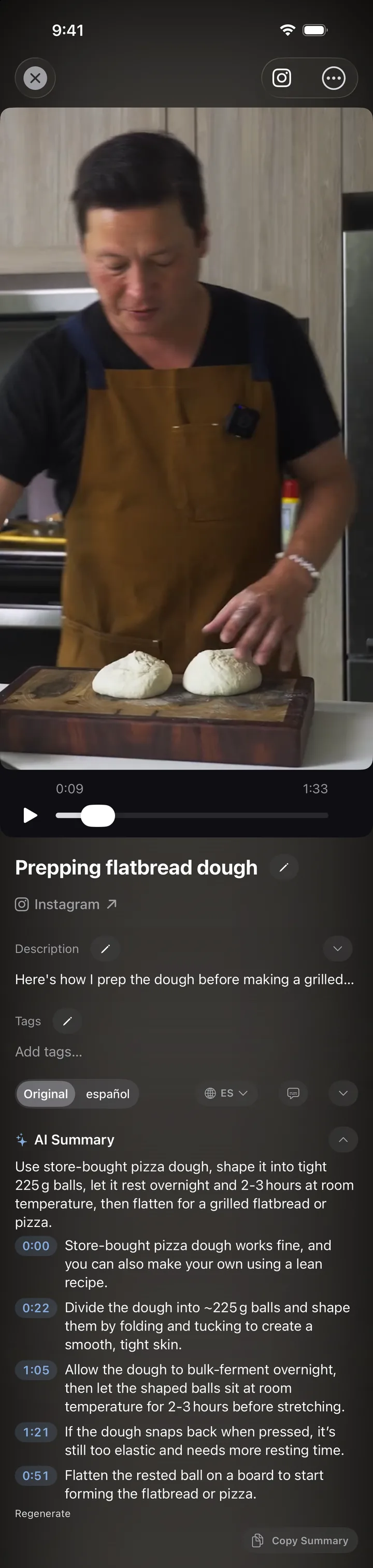
This is a real summary of a 94-second Kenji López-Alt Reel about flatbread dough. One sentence on top, the key points below, with the time each one happens. Pick a language for the summary, and with Pro switch the transcript to another language too.
Questions
About Instagram Reels summaries in MarkerShelf.
What does a Reel summary look like?
One sentence that sums up the Reel, then 3 to 6 short points. The points come with timestamps; tap one and the Reel plays from that moment.
Will it summarize a Reel without captions?
Yes. MarkerShelf turns the Reel's audio into text with speech-to-text and builds the summary from that, so the creator's captions don't matter. To watch it with subtitles, see subtitles for videos without captions.
Can the summary be in another language?
Yes. Choose a language for the summary and it is written in that language, even if the Reel is in another one. The transcript stays in the spoken language unless you translate it with Pro.
How much does it cost?
Free and Marker include a preview: the summary's first sentence and the first 30 seconds of the transcript. Pro gives you the whole summary and transcript, plus translation and word search, for $6.99 a month or $49.99 a year. The yearly plan starts with a 7-day free trial.
Do I have to log in to Instagram?
No. MarkerShelf only works with public posts and doesn't use your Instagram account. If Instagram puts its own sign-in screen in the player, that comes from Instagram.
Is the Reel saved on my phone?
No. MarkerShelf keeps the link, the summary and your notes; the Reel plays from Instagram. With Pro you can copy the summary or the transcript.
How do I summarize an Instagram Reel?
Share the Reel to MarkerShelf, tap Transcript — Generate, then tap Summarize with AI. You get one sentence on what the Reel is about and 3 to 6 key points with timestamps.
Good to know
- Summary or transcript? The summary is the short version: one sentence and a few key points. The transcript is every spoken line with its time. MarkerShelf writes the transcript first and builds the summary from it. To read every word, see how to get an Instagram Reels transcript.
- Pick the summary language. You can choose the language of the summary on any plan. Pick it before you tap Summarize with AI, and the summary is written in it, even when the Reel is in another language. Translating the transcript needs Pro.
- Recipes and workouts. The key points list the main steps, so you can see what a recipe needs or what a workout covers before you press play. Tap a time and the Reel jumps to that step.
- Check names and numbers. The summary is built from speech-to-text, so a name, an amount or a rep count can come out wrong. Tap the timestamp and listen to that part before you rely on it.
- Find a word later. With Pro, search what was said across all your saved videos. Tap a result and the video plays from that second.
- Other apps work the same way. Facebook videos and reels, TikTok, YouTube, X and LinkedIn videos, and your own videos from Photos and Files. See TikTok summary or the AI video summarizer.
- iPhone and iPad today. MarkerShelf needs iOS 26 or later, and your library syncs between your devices through iCloud. An Android app is in development.

Never lose a moment in a video again.
Share your next Reel and keep its main points, with timestamps, on iPhone and iPad.